A clear, honest Icon review for 2025. Learn how Icon helps creators and businesses plan, script, and produce ads faster, what its best features are, who it’s for, and whether it fits your marketing workflow.
Quick Summary
Icon is an AI platform built for creators, small businesses, and marketers who want to produce effective ads without juggling multiple tools. It brings idea generation, copywriting, video creation, and testing into one workspace, which makes it easier to create more ads and learn what works. In this review, I share how the “14-in-1” toolkit performs in real workflows, how AdGPT develops ad angles and scripts, and how the AI CMO feature helps with early research and creative planning.
If you want to explore the platform while reading, you can visit the Icon website. This is the same link I use for my own setup, and it helps support my work if you decide to try the tool for yourself.
For a wider view of how AI is reshaping modern advertising, you can read this analysis from Forbes on how AI is changing marketing. It breaks down how AI is improving targeting, creative testing, and customer understanding. This helps put Icon in context and shows the broader shift happening in digital marketing today.
This Icon review focuses on real use cases, honest pros and cons, and simple steps you can follow to try Icon for yourself. The goal is to help you understand whether it fits your content workflow and how it can support the kind of ads you want to produce.
Table of Contents
What is Icon?
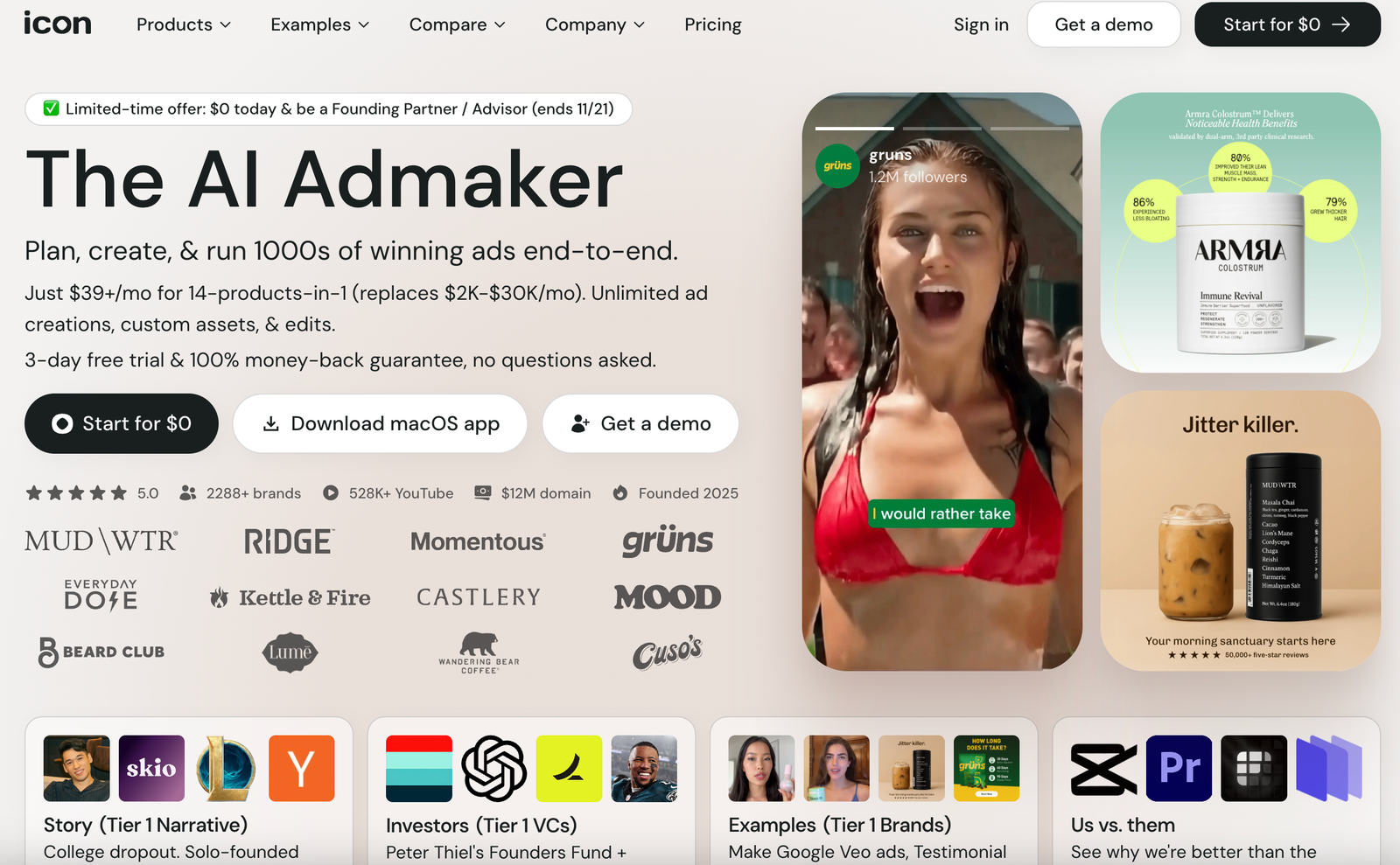
Before going deeper into this Icon Review, it helps to understand what the platform actually is. Icon is an AI platform that helps creators, small businesses, and marketers produce ads more efficiently by combining idea generation, copywriting, video tools, and testing features in one place. Instead of juggling multiple apps, you can plan, draft, and build your ads inside a single workspace.
The platform’s most noticeable strength is how quickly it moves you from a concept to a finished ad. Tools like AdGPT help generate hooks, angles, and scripts based on your product and audience, while the built-in editors support both video and static ad creation. This approach makes it easier to create multiple variations and run real tests instead of relying on a single idea.
Icon also includes an “AI CMO” feature that analyzes your brand inputs, website, and competitor ads to suggest creative directions worth testing. This kind of AI-supported research is becoming standard in digital marketing, and publications like AdWeek have highlighted how tools like Icon reflect a broader shift toward faster, data-driven creative development.
In short, Icon aims to be more than an ad generator. It serves as a creative engine that helps you produce more ideas, more variations, and more testable content so you can find what works sooner.
Who is Icon for?
Icon is built for anyone who needs to create ads on a regular basis and wants a smoother, faster workflow. This includes solo creators, small business owners, social media managers, affiliate marketers, and agencies that handle multiple clients. If your work involves planning content, producing visuals, writing scripts, or testing different ad variations, Icon can help you save time and stay organized.
It is especially useful for people who feel overwhelmed by switching between too many tools. With Icon, tasks like idea generation, copywriting, video editing, and resizing happen in one place. This makes it easier to keep your creative process consistent and to produce more testable content each week.
Icon also fits those who want to improve performance through structured experimentation. If you rely on data to find winning hooks, angles, or creative styles, the platform supports quick iterations and helps you build a steady flow of variations to test.
Whether you run ads for your own brand or manage content for clients, Icon is a practical option if you want a creative system that moves quickly and keeps everything in one streamlined workspace.
Pricing: What You Need to Know for This Icon Review
Icon offers a simple pricing structure that makes it easy to test the platform without a big commitment. In this part of the Icon Review, I break down the pricing and what you can expect. You can start with a free trial, explore the tools, and get a sense of how the workflow fits into your content or advertising routine. After the trial, Icon moves to a paid plan that unlocks the full creative toolkit, including unlimited ad generations and edits. This is helpful for anyone who wants to produce variations regularly instead of working within strict limits.
For businesses that need more support, Icon also has a managed option where a team of editors, strategists, and creative specialists help build and refine your campaigns. This level is designed for brands that want extra guidance or prefer a more hands-on partnership.
If you want to check the current plans or see which option fits your workflow, you should visit the Icon website regularly. Pricing can change over time, so the official page will always have the most accurate and up-to-date details.
- Start Free Train Here: Try Icon
- If you need services plus software: Request a demo on Icon’s site. (icon.com)
Standout Features That Matter in Daily Work (Icon Review Feature Breakdown)
Icon offers a wide mix of tools, but a few features stand out because they have the biggest impact on your daily workflow. As I highlight throughout this Icon Review, these are the parts of the platform that genuinely help you move faster, stay consistent, and produce stronger, more testable content each week.
AdGPT for Fast Concepting and Scriptwriting
AdGPT is one of Icon’s most practical features. Instead of trying to come up with hooks, angles, and scripts from scratch, you can generate several directions with a single prompt. This is valuable for creators who need frequent ad variations or marketers running ongoing campaigns. Once you have the drafts, you can edit the tone, refine your voice, and shape them into the exact message you want to test.
Industry reports, like this one from HubSpot, show how marketers are increasingly using AI tools to speed up creative ideation, and AdGPT fits directly into that trend.
Tools for Both Video and Static Ads
Many AI platforms specialize in one format, but Icon supports both video and static creatives, which helps you keep your content consistent across different channels. You can cut clips, edit short videos, resize assets, write captions, and create static ads inside the same dashboard. This is helpful for anyone who publishes on Meta, TikTok, YouTube, or Pinterest.
As Social Media Examiner highlights, the demand for short-form video and fast creative iteration is growing. Icon’s structure is built to support that shift without requiring users to jump between multiple editing apps.
End-to-End Creative Workflow
One of Icon’s biggest advantages is that everything happens in one workspace. You can plan your concepts, write scripts, build visuals, create variations, and organize your tests in the same place. This keeps your process cleaner and reduces the time lost switching between tools. For marketers who work on weekly ad cycles, this kind of end-to-end workflow helps maintain momentum and encourages more frequent testing, which often leads to better results.
This approach aligns with the broader industry movement toward consolidated marketing stacks, noted in MarketingTech’s analysis on how brands are simplifying their creative workflows using AI platforms.
AI CMO for Early Creative Research
The AI CMO feature is designed to help you understand your creative landscape before you even start making ads. It looks at your inputs, your website, and competitor ads, then suggests a set of directions worth testing. This can spark new ideas and ensure you’re not repeating the same angles. Publications like AdWeek have highlighted how AI-driven research tools are becoming more common in modern advertising, and Icon’s approach reflects that trend.
Unlimited Generations and Edits
Unlimited generations may not sound like a major feature at first, but it matters. Most winning ads come from consistent testing, not a single script or idea. With no limit on how many variations you can create, you can explore more angles, more hooks, and more formats without worrying about hitting a monthly cap. This helps you keep your creative system flexible and supports long-term experimentation.
How Icon Works in Practice (Icon Review Workflow)
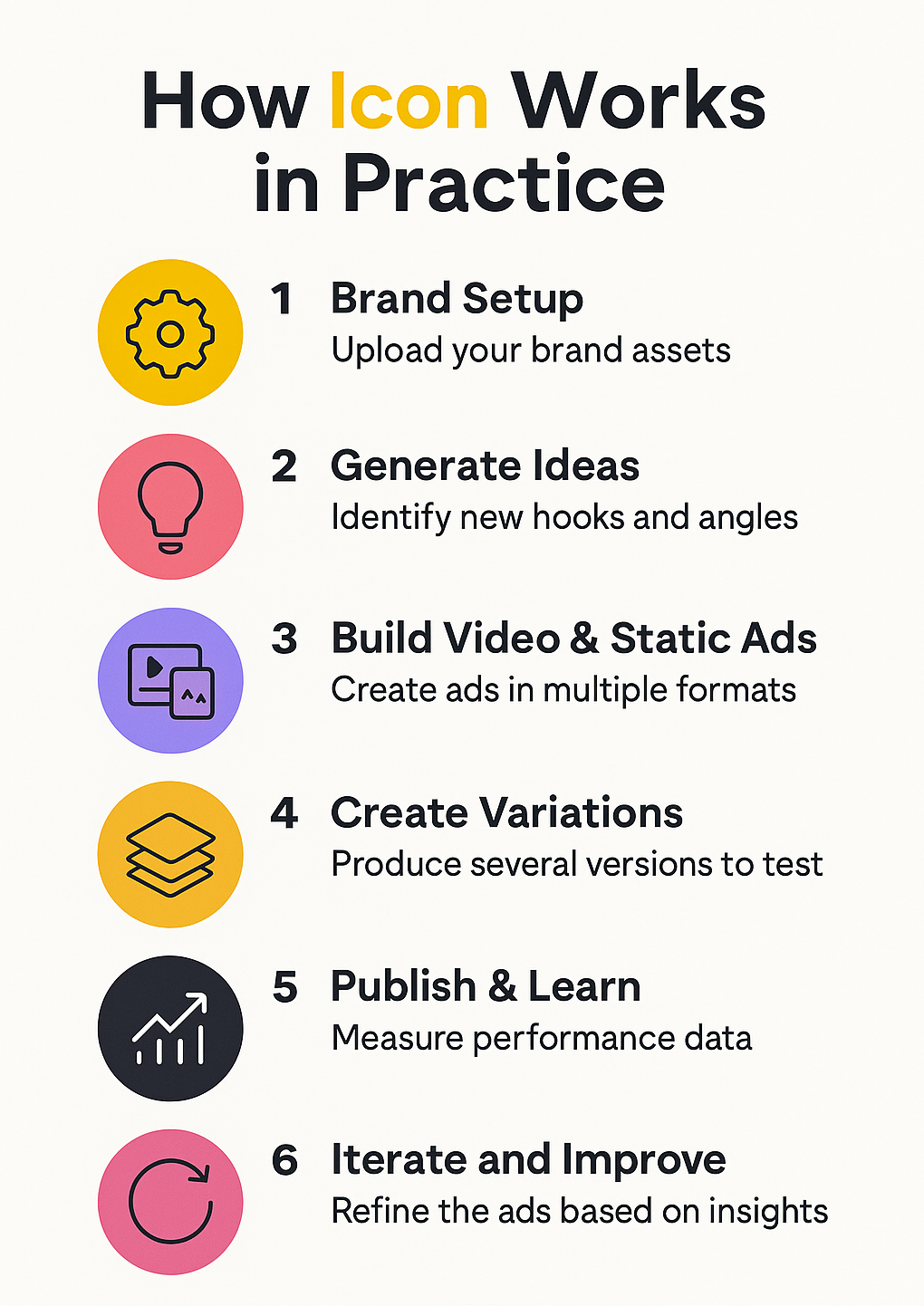
Icon is built to simplify the entire creative process, from early brainstorming to publishing finished ads. The workflow is designed for people who want to move quickly, create more variations, and rely on a system that keeps everything organized. Here is a clear breakdown of how Icon works in real projects and why users mention it so often in Icon Review discussions.
Step 1: Set Up Your Brand and Inputs
Your first step is to give Icon the information it needs to understand your product or service. This includes your website, brand guidelines, customer pain points, and past winning ads. Once you upload these inputs, the platform uses them to shape your creative direction and generate ideas that match your brand voice.
Modern marketing research, such as findings from Think with Google, emphasizes that high-quality inputs lead to stronger AI outputs, which is exactly how Icon approaches its onboarding process.
Step 2: Generate Ideas and Scripts with AdGPT
After setup, you can use AdGPT to generate hooks, angles, and scripts. You enter a simple prompt and the tool produces multiple creative directions to explore. This removes the slow, painful part of staring at a blank screen and gives you a variety of concepts to test.
Reports from HubSpot show that marketers who use AI for planning and ideation often produce more consistent content, and Icon fits directly into that workflow.
Step 3: Build Video and Static Ads
Once you have your ideas, you can start building your visuals. Icon includes tools for both video and static ads, which lets you create everything in the same workspace. You can cut clips, add captions, resize assets, and prepare versions for platforms like Meta, TikTok, YouTube, and Pinterest. This reflects a broader shift in advertising workflows toward faster, AI-powered creative production. A recent article from MarketingHire explains how AI is streamlining content creation and campaign testing, which aligns closely with the way Icon is designed to work.
Step 4: Create Variations at Scale
Icon makes it simple to create many variations of the same ad. You can adjust hooks, swap visuals, change captions, and resize assets without starting over. The idea is to build a wide mix of testable content, because the strongest campaigns usually come from repeated experimentation, not one perfect idea.
Step 5: Publish and Learn from Your Tests
Once your ads are ready, you can organize your variations into tests and publish them according to your strategy. Icon’s workflow is built around fast feedback loops, which means you can quickly identify what is working and what needs improvement.
This type of rapid iteration is now a core part of digital advertising, supported by industry studies from platforms like Think with Google and other marketing research groups.
Step 6: Use Insights to Create Your Next Winners
After your tests run, you can use your performance data to guide your next round of creative work. The goal is simple: build more of what performs well and learn from what does not. Icon’s system helps you stay consistent with this cycle so your creative process becomes more predictable and easier to scale.
Quick Start: A 30-Minute Test Plan (Icon Review Guide)
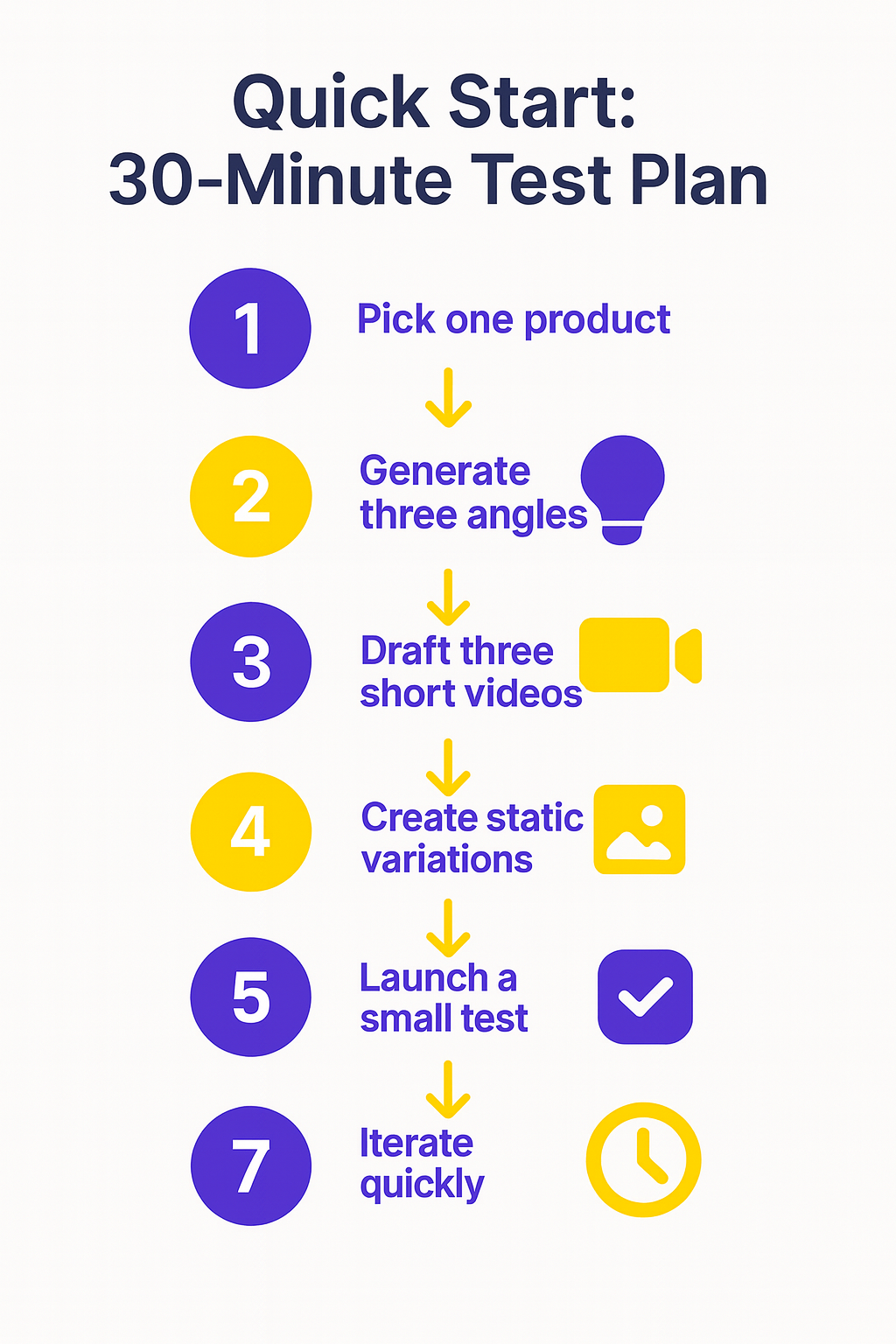
If you want a simple way to understand how Icon actually works, this quick test plan gives you a clear, hands-on look without spending hours exploring every feature. You can try it during your trial to see how the workflow feels and decide for yourself whether Icon fits your creative process. It also helps bring some of the points in this Icon Review into real use.
1. Pick one product and one audience
Choose something simple and write down the main problem it solves. This gives Icon a clear direction to work with.
2. Use AdGPT to generate ideas
Ask AdGPT for three angles and a few variations for each one. Keep the options that match your brand and discard the rest.
3. Create three short videos
Turn your favorite angles into quick video drafts inside Icon. Keep them simple and focus on strong hooks in the first two seconds.
4. Build a handful of static ads
Take lines you liked from the scripts and transform them into square or vertical static ads. Try a few variations.
5. Prepare a small test batch
Organize your videos and statics into a simple test. You don’t need a big budget to identify early signals.
6. Review early performance
Look at metrics like watch time, click-through rate, and early engagement. Use this info to see which angle feels strongest.
7. Iterate right away
Take your winning concept and ask AdGPT to rewrite it with new hooks or new visual directions. Create two or three updated versions.
This 30-minute plan helps you see how Icon handles idea generation, creation, and iteration without spending an entire day learning the platform.
Results You Can Expect from Icon (Icon Review Findings)
The results you see with Icon will always depend on your workflow and how consistently you test new ideas. As mentioned throughout this Icon Review, the tool isn’t meant to replace strategy, but it can speed up the parts of ad creation that usually slow people down—like generating angles, rewriting hooks, cutting short videos, and producing several variations at once. When you use Icon regularly, it becomes much easier to stay on a steady weekly testing rhythm, which is often where the real improvements start to show.
If you already have a solid offer and a landing page that converts, Icon can help you produce more variations and identify your best-performing creative much faster. This leads to clearer insights, more predictable creative cycles, and stronger results over time. It also reduces the stress of trying to write or edit everything manually. A recent breakdown from Sprout Social highlights how AI-supported creative workflows often help teams save time and improve campaign consistency, which aligns closely with how Icon is designed to function.
For creators and small businesses, the biggest improvement is usually creative output. Instead of making one or two ads a week, you can produce multiple variations in a single session and test them in small batches. This makes your learning curve much faster because you’re getting real performance data, not guessing which concept might work. For agencies, the value is often stronger workflow organization, faster turnarounds, and the ability to deliver more options to clients without increasing workload.
Overall, Icon helps people move from slow, scattered production to a more structured creative system. If you follow a simple test-and-learn routine and use the platform consistently, the results tend to build week after week.
- Best case: faster learning cycles, more winning ads, and lower cost per result over time.
- Average case: improved creative throughput and clearer testing structure.
- Worst case: more assets with the same performance if you do not enforce quality and strategy.
Pros and Cons (Icon Review Summary)
Every tool has strengths and weaknesses, and Icon is no different. Understanding both sides helps set realistic expectations and makes it easier to decide whether it fits your workflow.
Pros
- Strong creative speed and idea generation
AdGPT and the “14-in-1” toolkit allow you to brainstorm angles, write scripts, and build variations in less time. This helps creators and marketers who want a steady flow of testable content without spending hours writing and editing from scratch. - All-in-one workspace for video and static ads
Many platforms only handle scripts or visuals, but Icon supports both. You can create short-form videos, resize assets, adjust captions, and build static ads within the same system. This is helpful for anyone posting across Meta, TikTok, YouTube, or Pinterest. - Useful early-stage research with AI CMO
The AI CMO feature analyzes your inputs and competitor ads to suggest creative directions you may not have considered. This kind of AI-supported creative planning reflects what industry analysts describe as the new norm for digital advertising. For example, Search Engine Journal reports that more marketers rely on AI tools to speed up planning, brainstorming, and audience research. - Unlimited ad generations and edits
Unlimited variations make a difference when you are testing frequently. Instead of worrying about monthly caps, you can explore more concepts and refine your messaging based on performance data. This encourages experimentation, which is usually where strong campaigns come from.
Cons
- You still need a clear strategy
Icon can speed up the creative work, but it does not replace strategy or audience understanding. If your offer or landing page is weak, more ads will not fix the problem. - Some outputs require editing
Like any AI tool, the first drafts are not always perfect. You will often need to adjust tone, structure, or visuals to match your brand. Treat Icon as a creative assistant, not a full replacement for human judgment. - Platform updates can shift the workflow
Icon evolves quickly. New features, renamed tools, and updates to the interface may require a brief adjustment period. This is normal for fast-growing platforms, but worth keeping in mind if you prefer slower, more predictable software changes.
Best Practices for Getting the Most Out of Icon (Icon Review Tips)
These simple guidelines make it easier to get stronger results with Icon and keep a steady creative process, and they also reinforce many of the points covered earlier in this Icon Review.
1. Start with clear hooks
Your first line matters more than anything else. Write the hook first, then build the rest of the script around it.
2. Focus on angles, not tiny wording changes
Problem-focused, social proof, and demonstration angles usually outperform small copy tweaks. Start with strong concepts.
3. Feed Icon real customer language
Use reviews, FAQs, and customer feedback as inputs. This helps AdGPT match your authentic voice and messaging style.
4. Keep videos short and direct
Short-form ads tend to collect stronger signals faster. Aim for tight, simple cuts rather than overproduced visuals.
5. Test in small batches
Instead of launching 10 ads at once, test three or four variations, learn from them, then create the next round.
6. Create a “winner library”
Save your top-performing ads, notes, and hooks in one place. Over time, this becomes your personal creative playbook.
7. Align your landing page with your ads
If people click but don’t convert, it’s usually the landing page. Keep your messaging consistent from the ad to the page.
These best practices help you get reliable results, stay organized, and make Icon a consistent part of your weekly creative workflow.
Icon vs AdCreative vs Creatify at a Glance (Comparison for This Icon Review)
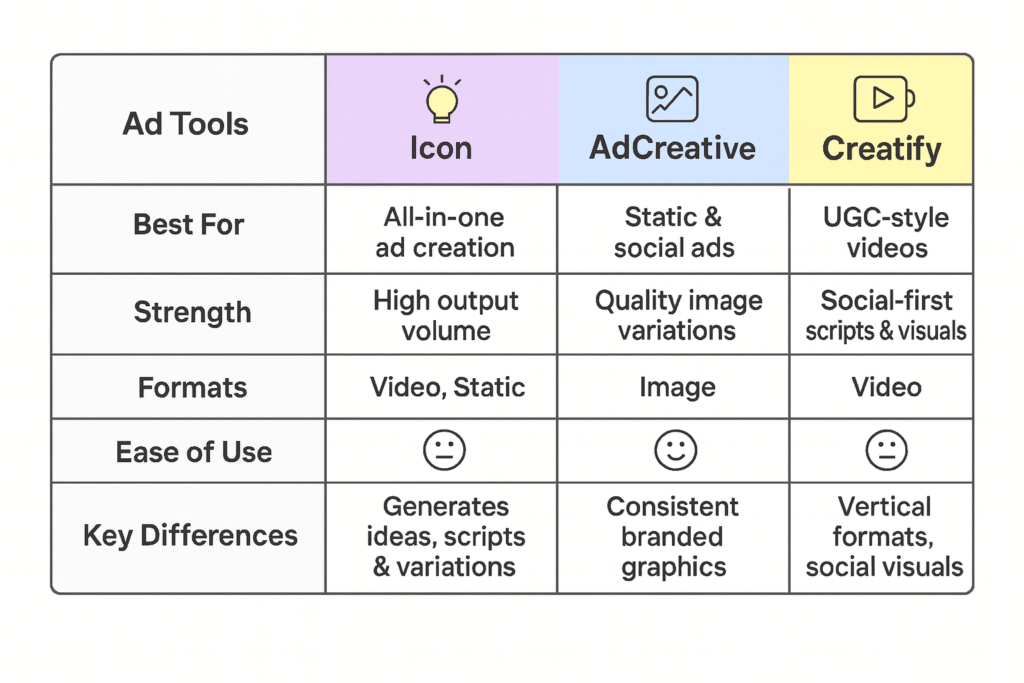
Icon, AdCreative, and Creatify all help with ad creation, but each one serves a different type of creator or marketer. In this part of the Icon Review, here’s a simple, clear overview to help you understand how the three platforms compare and where each one fits best.
Icon is the most complete option of the three. It combines idea generation, scriptwriting, video tools, static ad creation, and creative research in one place. It is built for creators and marketers who want to produce a high volume of variations and test ideas quickly.
AdCreative focuses mainly on generating clean, high-quality static ads and social graphics. If you want consistent, branded image variations without spending much time designing, AdCreative is reliable. You can read my review here: AdCreative.ai Review.
Creatify is geared toward UGC-style video ads. It helps you generate scripts, visuals, and voiceovers that look more like social-first content made by real creators. This is useful for TikTok-style ads or brands that rely on authentic, short-form videos. My review is here: Creatify Review.
Quick takeaway:
- If you want an all-in-one ad engine, choose Icon.
- If you need fast static ads, choose AdCreative.
- If you want UGC-style videos, choose Creatify.
This simple comparison helps you understand which tool fits each part of your workflow, and you can always combine them as needed.
Is Icon worth it?
Whether Icon is worth using depends on how often you create ads and how important speed is in your workflow. Throughout this Icon Review, the key idea has been simple: the more you rely on regular testing and consistent creative output, the more value you will get from the platform.
Icon is worth considering if you create ads regularly and want a faster, more organized way to produce variations. It helps you move from slow, manual production to a workflow where ideas, scripts, and visuals come together quickly, so you can focus more on strategy and testing. For creators and small businesses, this often leads to more consistent campaigns and a clearer understanding of what actually performs.
AI-supported creative tools are becoming a standard part of digital marketing, and a recent breakdown from HubSpot shows how AI is helping marketers speed up creative production, test more variations, and improve campaign performance. Icon fits well with that shift by giving you one place to plan, create, and refine your ads without relying on multiple tools.
It is not a magic fix, and you still need strong messaging and a solid offer, but Icon can make the creative side much easier. Since you can explore it with a trial, it is simple to test whether it suits your workflow before making a long-term decision.
Honest Notes to Consider Before You Buy (Icon Review Transparency)
Before you decide whether Icon is the right fit, keep a few realistic points in mind. These are not dealbreakers, but they are important expectations to set so you get the best experience from the platform.
Icon is a creative assistant, not a full strategy tool.
It can help you generate hooks, angles, and visuals faster, but it won’t replace your understanding of your product, audience, or offer. Strong results still come from good positioning and clear messaging.
Some outputs will need editing.
Like all AI tools, Icon sometimes produces drafts that feel slightly off-tone or generic. You may need to adjust scripts, refine the hook, or clean up the visuals. This is normal, and most marketers treat AI outputs as strong starting points rather than final versions.
Your landing page and offer still matter most.
Even the best creatives won’t perform if the offer is unclear or the landing page is confusing. A recent overview from HubSpot explains that AI can enhance creative work, but success still depends on the fundamentals of good marketing.
Icon updates often.
New features and interface tweaks roll out frequently. This is great for innovation, but it also means the platform changes as you use it. If you prefer slower, more predictable software updates, it’s something to be aware of.
These notes don’t diminish Icon’s value, but they help set clear, balanced expectations. If you combine Icon’s speed with your own strategy and editing, the platform becomes a useful part of your creative system.
Final Thoughts
As we wrap up this Icon Review, the main takeaway is simple: Icon is built for creators, marketers, and small businesses who want a smoother, faster way to produce ads without getting stuck in slow, repetitive work. Its combination of idea generation, scriptwriting, video, static creation, and creative research makes it a strong choice if you rely on consistent testing to improve your results.
The platform works best when you use it regularly. The more ideas and variations you create, the easier it becomes to understand what resonates with your audience. Icon helps you stay organized, move faster, and build a more predictable creative workflow.
While no AI tool replaces strategy or a clear understanding of your audience, Icon can take over much of the manual work, freeing you to focus on what matters most: refining your message and improving your campaigns. If you want to explore the platform while reading this review, you can visit the Icon website to see how it fits into your creative process.
As AI continues to reshape digital advertising, tools like Icon offer a useful way to keep up with the pace of modern marketing and give yourself a structured, reliable system for producing better ads over time.
If you want to try it, you can click here to direct you to the official Icon website.
For more on testing and creative strategy, read my other posts:
FAQs
1. What makes Icon different from a normal AI copywriter?
In this Icon Review, one of the biggest differences highlighted is that Icon is explicitly built for marketing and ad creation, not general writing. For instance, AdGPT is built for marketing use. It produces hooks, angles, scripts, and variations that map to ad testing. Combined with visual tools and the “14-in-1” suite, it helps you move from idea to launched tests inside one platform.
2. Can Icon actually run my ads or only create them?
As explained in this Icon Review, the platform focuses mainly on helping you plan, create, and organize your ads rather than fully managing campaigns. If you want done-for-you help, the managed plan includes human experts and starts at $1,000 per month.
3. What does Icon cost?
This Icon Review mentions that Icon offers a simple pricing structure starting with a trial, followed by paid plans that unlock the full creative toolkit. The public price is listed at $39 per month after a 3-day free trial, with a money-back guarantee. Pricing on third-party sites may differ, which is why I link to the official page.
4. Where does Icon get ideas for ads?
Icon’s “AI CMO” concept draws from your brand, site, competitor ads, and performance data to generate concepts you can test. Use these as starting points and refine with your own insights.
5. Is there a free option?
You can start with a short free trial before the $39 plan begins. If it is not a fit, the refund policy reduces your risk.